Cloud Pass: An Endless Motorcycle Ride Through the Mountains
A motorcycle ride toward a hilltop arch with scroll-driven camera, multi-speed parallax and a fisheye lens. The author open-sourced the technique as three reusable agent skills.
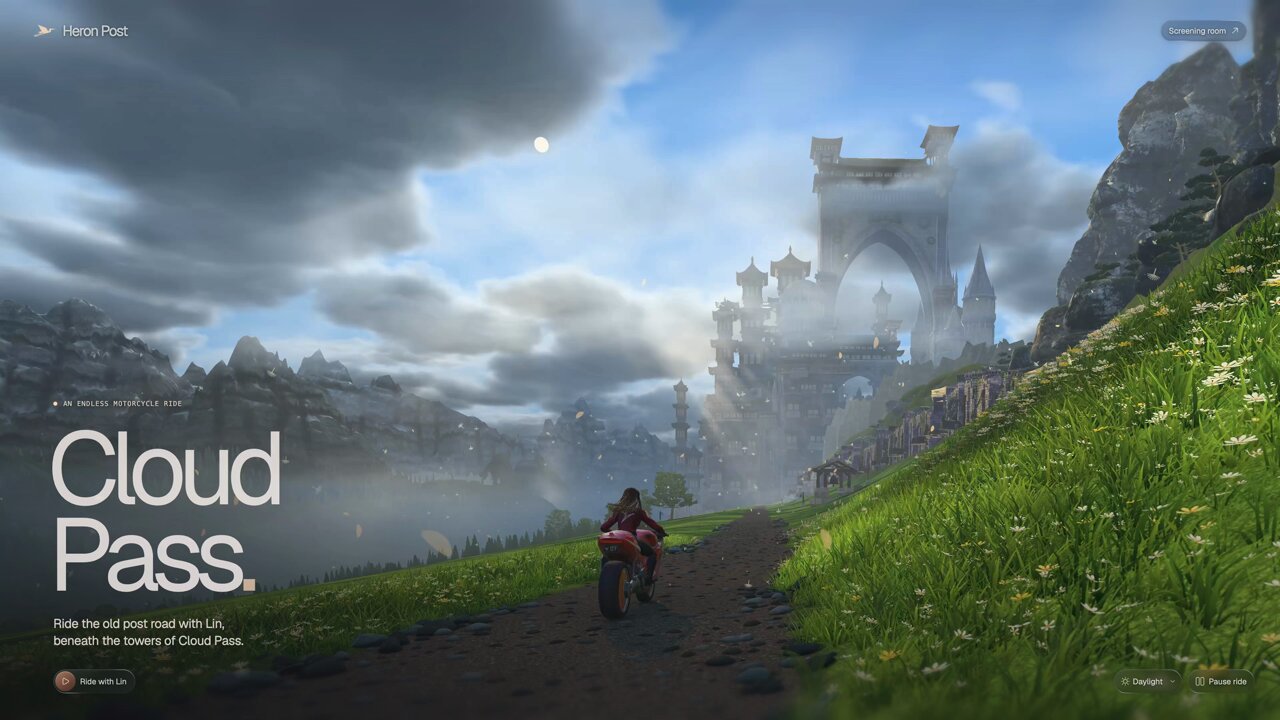
Prompt
# endless-riding-parallax
# 来源: https://raw.githubusercontent.com/MengTo/Skills/main/agent-skills/3d/endless-riding-parallax/SKILL.md

---
name: endless-riding-parallax
description: Use for motorcycle rides and endless runners that need nearby ground to pass quickly while a distant castle or mountain range moves slowly.
---

# Build an endless riding landscape

1. Keep cumulative travel as a JavaScript number. For constant speed use `distance = elapsedSeconds * speed`; for variable speed integrate velocity over elapsed time. Use this same station for the road, wheel contact, roadside plants and odometer.
2. Reuse a finite set of road and verge instances ahead of the camera. Return each instance to the far end only when it has cleared the visible region. Feed the GPU the remainder for each repeating period. Keep the integer cycle in CPU code when placement needs a stable seed.
3. Parent the castle, its foundations, the plains and the nearer mountain faces to one landscape transform. Apply that displacement to shadows, lighting probes and culling queries in the same frame. The depth of each feature determines its screen speed.
4. For a finite vista, use a small closed camera-relative move. Cloud Pass uses `x = 1.2*(1-cos(a))`, `z = 12*sin(a)` with `a = 2π*(t % 140)/140`. Position and velocity match across the join. Keep forward motion on the road running across this boundary.
5. Check a side view as well as a chase view. The relative motion is easiest to see where a nearby tree overlaps a distant roof. Check wheels against the ground separately when the landscape is displaced.

## Check the result

At the same focal length, a sideways displacement should move a marker at 10 units about ten times as far across the image as a marker at 100 units. At 139.99 and 140.01 seconds, the scenery should pass smoothly through its origin.

Run `node examples/check.mjs` from this skill folder for the numeric check.

# scroll-fisheye-dolly-zoom
# 来源: https://raw.githubusercontent.com/MengTo/Skills/main/agent-skills/3d/scroll-fisheye-dolly-zoom/SKILL.md

---
name: scroll-fisheye-dolly-zoom
description: Use for a scroll or pinch camera that widens from a normal lens into a mild fisheye while the rider, vehicle or portrait stays framed.
---

# Scroll a rider-locked fisheye lens

1. Save the normal camera pose, the subject’s projected position and the vertical field of view before applying the lens. Rebuild from that pose each frame so small wheel events cannot accumulate camera error.
2. Convert wheel lines and pages to pixels. Let a positive wheel delta widen the lens. Clamp a width control to 0–1, ease toward it using elapsed time, and give pinch and keyboard input the same control. Leave modified wheel gestures to the browser.
3. For width `w`, use `spread = 1 + 0.72*w`. Divide the subject-to-camera vector by `spread`, then multiply `tan(fov/2)` by `spread`. Their product sets the visible height at the subject. Clamp the camera above terrain before reprojecting the subject.
4. Use `curve = 0.30*w*w`. Multiply the widened FOV tangent by `1+curve` for overscan. Keep the saved subject position by adjusting the projection offsets, then refresh the inverse projection matrix. Center the distortion at that screen position.
5. In the final scene pass, sample at `center + delta * (1 + curve*r2)/(1 + curve)`. Compute `r2` from the aspect-corrected squared distance to the anchor, normalized by the furthest corner. Put rain and clouds through the same pass. Draw HTML controls afterward. At zero width the original lens can render directly.

## Check the result

Measure the chest-to-seat distance in pixels at normal and wide settings. A few percent of change gives a convincing dolly zoom. The ground beside the bike should expand, straight features at the edges should bend, and scrolling back should recover the first frame.

Run `node examples/check.mjs` from this skill folder for the numeric check.

# ride-particles-and-clouds
# 来源: https://raw.githubusercontent.com/MengTo/Skills/main/agent-skills/3d/ride-particles-and-clouds/SKILL.md

---
name: ride-particles-and-clouds
description: Use for forward motion through pollen, seeds or rain below moving 3D cloud layers. Tie the atmosphere to the terrain and the light.
---

# Light windborne particles under a 3D sky

1. Seed a fixed pool of instanced quads once. Give each a field station, altitude, wind phase and size. Start with mostly tiny grains and a few recognizable seeds. Cloud Pass uses 920 instances on desktop and 425 on smaller devices.
2. Advance the near population through a bounded depth volume using the road station. For a 34-unit corridor, `z = mod(seedZ + travel + flutter, 34) - 24`. Use positive modulo. Sample the terrain at the particle’s displaced position and add its altitude so the particles follow the slope.
3. Fade both ends of the wrap. Cloud Pass fades the far edge in field coordinates, then fades very near and very distant particles in camera depth. Change the sideways seed offset at the hidden boundary. Project the previous and current positions through their respective camera matrices for motion streaks. Reset that history after a seek or camera cut.
4. Sample 3D cloud density in world or weather coordinates. Move the noise with wind independently of the road. March each camera ray through the cloud layer up to the opaque geometry depth. At each step accumulate scattered light, then reduce transmittance by `exp(-density*stepLength)`. A lower-resolution cloud pass can be upsampled with scene depth to resolve rooflines.
5. Share the sun direction and weather state between the cloud scattering and particle highlights. Render transparent particles with depth testing and without depth writes. Let sunset and storm change the light on the seeds as well as the sky.

## Check the result

Pause travel and orbit. A seed should pass in front of or behind the rider according to depth, and a roof should occlude a cloud bank behind it. Inspect the nearest and furthest positions of one seed, then switch from daylight to low light and check the highlights.

Run `node examples/check.mjs` from this skill folder for the numeric check.
Reproduction guide
How to reproduce
- Clone the skills repo:
git clone https://github.com/MengTo/Skills, then read the threeSKILL.mdfiles underagent-skills/3d/:endless-riding-parallax,scroll-fisheye-dolly-zoom,ride-particles-and-clouds. - Feed the skills to your coding agent — these folders are designed as Agent Skills for Claude Code / Codex / Cursor, so letting the agent implement them beats hand-writing prompts.
- Key techniques (from SKILL.md): keep cumulative travel as a JS number (
distance = elapsedSeconds * speed); recycle a finite set of road instances instead of infinite generation; parent all far features to one landscape transform — depth determines screen speed. - Verify: check relative motion in a side view first, then return to the chase cam for wheel-ground contact.